Ultimate and Essential Guide to Google Ads [Example]


You'd best spend the money where it will be most effective if you're thinking about investing in advertising to reach your target market. That is, a location with 5 billion daily interactions and more than 2.9 billion monthly unique visitors. similar to Google. Two years after Google.com, which quickly rose to become the most visited website in the world, Google Ads was introduced. The advertising platform first appeared in October 2000 under the name Google Adwords, but in 2018 it underwent some rebranding and became known as Google Ads.


Free plans, templates, and guides:
Understanding Google Ads for Business

Given Google's extensive reach, both you and your potential consumers have probably seen (and clicked on) Google advertisements.


It's no secret that today, the more effective and targeted your paid advertisements are, the more clicks you'll get, increasing your chances of winning over new clients. It's understandable why businesses across all sectors are using Google Ads more and more frequently. Learn how to start advertising on Google with this guide. To get the best results from your ads, we'll go through platform-specific features and show you how to optimize your campaigns.

Describe Google Ads?

Google Ads is a platform for paid advertising that falls under the pay per click (PPC) marketing category, in which you, the advertiser, pay per click or impression (CPM) on an ad. Using Google Ads is a successful technique to attract clients who are qualified or "matched," meaning they are looking for goods and services similar to what you provide. You may improve website traffic, phone calls, and in-store visitors using Google Ads. With Google Advertising, you can develop and distribute ads to your target market at the ideal time (on mobile and desktop). As a result, when your target clients look for goods and services similar to yours, your company will show up in search engine results pages (SERPs).
By doing this, you may reach your target market when it makes sense for them to see your advertisement.

Notably, advertisements from the platform might also appear on YouTube, Blogger, and the Google Display Network.

In order to help your company meet all of its paid campaign objectives, Google Ads will gradually assist you in analyzing and improving those ads in order to reach more people.


Additionally, you can modify adverts to match your budget regardless of the size of your company or the resources you have at your disposal. You can keep under your monthly budget with the help of Google Ads tools, and you may even suspend or discontinue your ad expenditure at any moment.

Moving on to another crucial subject, are Google Ads actually effective? Let's look at some statistics to find a solution to this:
  • The click-through rate for Google Ads is roughly 2%.
  • Every month, 180 million impressions are produced by display adverts.
  • Paid adverts on Google receive 65% of clicks from individuals who are prepared to make a purchase.
  • 43% of buyers make a purchase after seeing an advertisement on YouTube.
Are Google Ads effective?

Google Ads do indeed work. With lead flows and optimized ad campaigns, you may develop marketing campaigns with great return on investment.

Why should I run a Google ad?

With more than 5 billion daily searches, Google is the most popular search engine. Furthermore, the Google Ads platform has been in existence for about 20 years, providing it some experience and legitimacy in sponsored advertising. People use Google as a resource to ask questions, which are then answered by a combination of paid advertisements and organic results. Does it require another reason? Your rivals employ Google Ads (and they may even bid on your branded terms). Because so many businesses use Google Ads to market their brands, even if you rank organically for search queries, your results will be pushed down the page and behind those of your rivals. If you employ PPC to advertise your goods or services (the only exception might be Facebook Ads, but that's another issue).

Best Practices for Google Ads

Don't give up if you've tried unsuccessfully to advertise on Google. Your Google Ads may not be operating as they should for a variety of reasons. However, let's first go through some common Google Ads recommended practices.

1. Use a template for PPC planning


You can keep your PPC efforts organized by using a planner. With the help of the Google and HubSpot PPC Planning Templates, you can manage all of your campaigns from one location and see how your ads will appear online and in text form.

2. Steer clear of general keywords

Testing and fine-tuning should be a component of your approach because you really should do it for your keywords. Your ad will be shown to the wrong audience if your keywords are too general, which will result in fewer hits and a higher ad cost. Review what works (i.e., which keywords result in clicks) and make the necessary adjustments to fit the ad. you and the people you want to reach. It's possible that you won't get the ideal blend on your first try, but you should keep introducing, eliminating, and modifying keywords until you do.

Review the keyword techniques we discuss below.

3. Avoid running pointless adverts

You won't obtain enough clicks if your ad doesn't correspond to the searcher's intent to make your ad spend worthwhile. The keywords you're bidding on and the answer your ad marketing needs to address any issues searchers may be experiencing should match in your ad title and text. This combination will give you the outcomes you want; it could just require a few adjustments. You can create many ads for a campaign; utilize this tool to assess which ones are most effective. Use Google's Responsive Search Ads tool instead, or even better.

4. Raise your quality rating (QS)

Google uses your Quality Score (QS) to determine where to rank your adverts. Your positioning and ranking in the Search Engine Results Pages will improve with a higher QS (SERP). Your advertising will receive less attention and offer fewer conversion prospects if your quality score is low.


It is your job to raise your Quality Score, even if Google tells you what it is.
Advice: Continue reading to find out how to raise your QS.

5. Improve the landing page for your ads.

Your work shouldn't end with the advertisement; the post-click customer experience is as crucial. What do users view after clicking your advertisement? Is the conversion rate on your landing page optimized? Does the page provide answers to your users' inquiries or fix their problems? Through the conversion process, your users ought to move seamlessly.

Review best practices for landing pages and use them to boost your conversion rate.

Knowledge Required for Google Ads

1. AdRank 
2. Negotiate
3. Campaign Format
4. The percentage of clicks
5. Ratio of conversion 
6. Network Show
7. Extensions to Ads 
8. Key phrases
9. PPK
10. Quality Rating


You may set up, manage, and improve Google Ads with the aid of these general phrases. While some of these are specifically tied to Google Ads, others are more broadly PPC-related. In either case, you need to be aware of this to manage a successful marketing effort.

1.AdRank 

Your ad placement is determined by your AdRank. The better you score, the more people will see your advertisement, and the more likely it is that they will click on it. Your maximum bid multiplied by your Quality Score yields your AdRank.

2. The bidding 

process for Google Ads is based on a system where the advertiser sets the highest bid price they are ready to pay for a click on their ad. The better your placement, the greater your bid should be. There are three ways to bid: 
  • CPC, CPM, or CPM. Cost per click, or CPC, is the sum you fork over with each click on your advertisement. The cost per thousand, 
  • CPM, refers to the price you pay when your advertisement is seen by 1,000 people. The sum you spend everytime someone responds to your advertisement is known as the "cost per engagement," 
  • The sum you spend everytime someone responds to your advertisement is known as the "cost per engagement," or CPE.              
Yes, we will discuss bidding tactics later.

3. Campaign Format

You can choose from seven different campaign types before beginning a sponsored campaign in Google Ads: search, display, video, shopping, app, smart, or max performance.
  • Text ads referred to as "search ads" are those that show up alongside search results on a Google results page.
  • Display advertising typically use images and are displayed on websites that are part of the Google Display Network.
  • On YouTube, there are six to fifteen second lengthy video adverts.
  • Shopping advertisements can be found in the shopping tab and Google search results.
  • App Campaigns improve site-wide advertisements using data from your app.
  • Google can determine the optimal targeting for your campaign with the use of smart campaigns.
  • A new campaign type called Maximum Performance enables marketers to use a single campaign to access all Google Ads inventory.

4. The percentage of clicks (CTR)

Your CTR is determined by how many clicks you receive in relation to the amount of views your adverts receive. A higher CTR suggests relevant keyword targeting and excellent ad match search intent.

5.Conversion Rate,  (CVR)

Form submissions as a percentage of all landing page views are measured by CVR. Simply defined, a high CVR indicates that your landing page fulfills the promise of advertising by providing a seamless customer experience.

6. Network Show

Google advertising may display on web pages that are part of the Google Display Network or on search results pages (GDN). GDN is a network of websites that allow Google Adverts to be displayed on their webpages. These text-based or image-based ads are shown next to material that is pertinent to your target keywords.Google Shopping and app campaigns are the most often used Display Ads choices.

7. Extension

With the aid of ad extensions, you may add free-of-charge information to your advertisement. Sitelinks, Calls, Locations, Offers, or Apps are the five categories that these extensions fall under; we'll go over each of these ad extensions below.

8. Key phrases

Google delivers a selection of results that correspond to the searcher's intent when a user submits a query into the search field. Keywords are words or phrases that fit the searcher's query and provide the results. Based on the searches you want your ad to show up for, you choose your keywords. For instance, if a user searches for "how to wipe gum off shoes," they will receive results for advertisers who have chosen to target terms like "gum on shoes" and "clean shoes."
A list of negative keywords includes those that you don't want to rank for. You will be removed from the keyword bid by Google. These are typically tangentially related to your target search term but unrelated to the services you provide or the keywords you wish to rank for.

9. KDP

PPC, or pay per click, is a form of advertising in which the advertiser gets charged for each click on an ad. Although PPC isn't exclusive to Google Ads, it is the most typical kind of paid campaign. Before starting your first Google Ads campaign, it's critical to comprehend all aspects of PPC.

10. Quality Score  (QS)

Your Quality Score evaluates the effectiveness of your advertising based on their click-through rate (CTR), keyword relevancy, landing page quality, and prior SERP performance. Your AdRank is determined by your QS.

How does Google Ads function?

Google Ads displays your advertisement to prospective clients or customers who are curious about your good or service. Depending on the type of advertising campaign selected, advertisers bid on search phrases, or keywords, and the winning bid is displayed at the top of a search results page, on a YouTube video, or on the relevant website. Your ability to create highly effective Google advertising is influenced by a variety of things. Below, we'll discuss that and provide some examples of Google Ads.

High Quality Score and AdRank

Your ad's placement is determined by AdRank, and Quality Score is one of two factors—the other being bid amount—that affect AdRank. Keep in mind that Google determines your Quality Score based on the relevancy and quality of your advertising and how many times they were clicked during their display, or your CTR. Your ad's ability to effectively match searcher intent determines how well it will perform on click-through rates (CTR).
  1. How relevant your keywords are
  2. if the searchers' expectations are met by your ad wording and CTAs
  3. User experience on your landing page
Even before you raise your bid price, you should pay close attention to your QS when you first start up a Google Ads campaign. Your acquisition expenses will be lower and you will be placed in better jobs if your QS is greater.

Location

You can select the region in which your advertisements will run when you first set up Google Ads. If you have a storefront, it should be quite close to where you are physically located. Your location should be placed at your delivery point if you operate an online store with tangible goods. The possibilities are endless if you offer a service or good that is available to everyone in the world. Your location settings will affect how you are placed. For instance, regardless of your AdRank, if you own a yoga studio in San Francisco, someone searching for a "yoga studio" in New York won't see your results. This is so because Google's principal objective, even when you pay, is to display the most pertinent results to searchers.

Keywords

Both paid advertising and organic search benefit from keyword research. Your keywords should, as closely as possible, reflect the searcher's intention. This is due to the fact that Google bases its matching of your advertising to search queries on the keywords you select. Google will display your advertisements based on the keywords you choose for each ad group you establish in your campaign (one to five keywords is ideal).

Game Type

When it comes to selecting keywords, Match Types allow you a lot of leeway because they inform Google whether you want to match a search query perfectly or whether your ad should be displayed to everyone who enters a semi-related search query. There are four different match types available:
  • The default choice, Broad Match, uses all of the words in your keyword phrases, regardless of their order. "Goat yoga in Oakland," for instance, would be equivalent to "goat yoga" or "oakland yoga."
  • Using the "+" symbol, modified broad match enables you to highlight certain words within a keyword phrase and lock them in. The locked term will at least be present in your matches. Goat, goat like food, or goat and yoga, for instance, could be returned by the search term "+goat yoga in Oakland."
  • Phrase Match will match queries that contain your keyword phrases in the right order, albeit they might also have other terms before or after them. Consider the variations of "goat yoga," such as "spotted goat yoga" or "goat yoga with puppies."
  • Precise Match keeps your keyword phrases in the exact order that they were written. If someone types in "goat yoga" or "goat yoga classes," for instance, "goat yoga" won't come up.
Move from wide match to a narrower strategy if you're just getting started and are unsure of how your personas search in order to test which queries get the greatest results. However, because your ad will rank for numerous queries (some of which are unrelated), you should monitor it and make any necessary changes as you learn more.

Title and Summary


Your ad copy may determine whether people click on it or one of your competitors' advertisements. Therefore, it's critical that your ad language coincides with your target keywords, reflects the searcher's intent, and provides a clear solution to their problem. Let's look at an example to see what we mean.


These are the search results for "infant swimming classes." The material is succinct and makes effective use of the available space to communicate its point and engage its intended audience. We immediately recognized that this advertisement was exactly what we were looking for because The Swim Revolution uses keywords in its titles. The description also explains why it is the ideal option for swimming lessons because it deals with the personality issues that parents who wish to enroll their child in swimming lessons face.

They reassure us that we will get what we want out of them by using words like "talent," "joy," "confidence," and "comfort in the water" to allay our fears about putting babies in swimming pools. a baby that can swim is in this class. This type of ad text will earn you clicks, but incorporating this degree of intent into your landing page copy will result in conversions.

Ad Extending

Ad Extensions should be used if you run Google Advertising for two reasons: they are free, and they give users more information and an additional motivation to interact with your ads. These extensions fit into one of the five categories listed below:
  • Sitelink Extensions enhance your ad, making you stand out, and provide users more enticing links to your site that encourage them to click.

  • You can add your phone number to Call Extensions so that people have another (immediate) means to get in touch with you. Include your phone number if you have a customer care team prepared to interact with and persuade your audience.
  • With location extensions, Google can display a map with your address and contact information to help users locate you. This choice works well for "...near me" search inquiries and is excellent for companies with storefronts.

  • Offer extensions are effective if you are currently running a promotion. If users notice that your options are more affordable than those of your rivals, they may choose to click on them instead of others' adverts.

  • For mobile users, app extensions offer links to app downloads. As a result, it is easier to find and download programs from the AppStore by doing new searches.


Retargeting with Google Ads 

Retargeting (or remarketing) in Google Ads is a strategy for promoting to internet visitors you've interacted with in the past but who haven't converted. Users who are tracked by cookies will be targeted with your adverts while they browse the web. Remarketing works well because most potential buyers need to see your advertising repeatedly before becoming clients. Pick a campaign type.

Types of Google Ads Campaigns

1.Searching 
2.Displaying
3. Video
4. An app
5. Shopping
In Google Ads, there are five different campaign kinds available. Let's talk about the best applications for each and the reasons you might favor one over the other.

1. Check out marketing campaigns

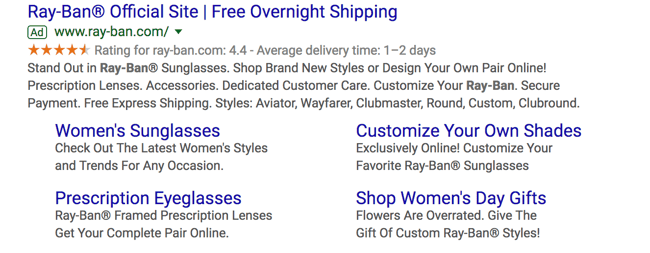
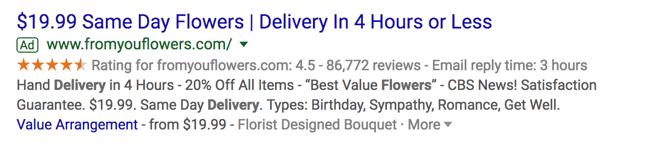
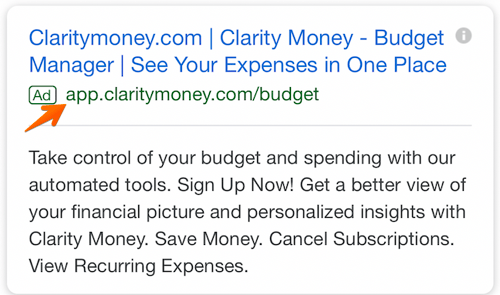
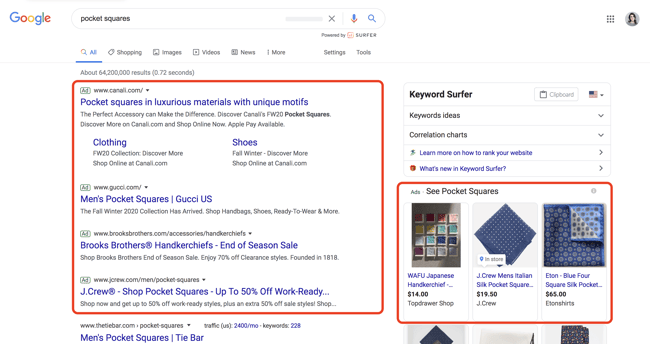
Text adverts called search ads are displayed on Google results pages. For instance, sponsored results for "pocket box" appear as follows:


The advantage of search advertising is that it places your ad on Google, where the majority of searchers look first. Users are accustomed to seeing and clicking on the result since Google presents your advertisement in the same way as every other result (apart from labeling it as a "Ad").
Ads for responsive search You can enter up to 15 different variations of your title and four different variations of your ad copy for responsive search advertising, and Google will select the variation that performs the best to display to people. Using the same title and description each time, you produce a static version of your advertisement for traditional advertising. According to Google, 

responsive advertising offers dynamic ads that are tested automatically until you find the one that performs the best for your target audience.

2. Ad campaigns for displays

 The Google Display Network is a network of websites maintained by Google that spans a variety of industries and has a group of audiences that opt to see Google Ads. The fact that website owners are compensated for each click or impression on an advertisement is a plus. The advantage for advertising is that they can present their material to a group of people who share their personality. These are often graphic advertising that draw readers' attention away from the website's content:

3. Ad campaigns for video

Do not forget that YouTube is a search engine. Therefore, using the appropriate keywords will position you in the video's front and divert viewers' attention. Here is a video advertisement that is interspersed with tutorials on how to tie ties:

4. Ad campaigns in apps 

Advertisements for your mobile app are displayed on the Google Search Network, YouTube, Google Play, Google Display Network, and other websites as part of Google App Campaigns. You can run advertisements urging users to download your app or, if they already have it, to take specific activities while using it. You do not create campaigns for apps, unlike other sorts of advertisements. Give Google the viewership and usage statistics for your app instead, then place a bid. Google takes care of the rest to expose your app to the appropriate users:


5. Advertising for online stores

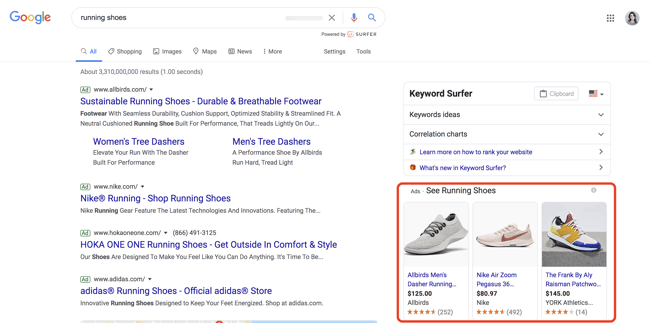
 The Google Shopping Ads Campaign is yet another sort of Google advertisement. Similar to other ad categories, shopping ads are shown in the SERPs and include specific product details like the price and image. Through Google Merchant Center, where you enter particular product data that Google gets to construct your shopping advertising, you may execute shopping campaigns. Shopping Ads let you advertise specific goods and product groups rather than your business as a whole. Because of this, when you conduct a Google search for a specific product, advertisements for several companies will show up at the top and/or sides of the page. When I search for "running shoes," I get results like these. The top banner is a Google Search advertisement, but the however, the particular item promoted on the side is a Shopping advertisement that is focused on the phrase "running shoes":


https://blog.hubspot.com/hs-fs/hubfs/Screen%20Shot%202020-09-17%20at%201.49.19%20PM.png?width=650&name=Screen%20Shot%202020-09-17%20at%201.49.19%20PM.png

Use of Google Ads

Have we persuaded you to start utilizing Google Ads? Nicely done. Starting is easy, but there are a few stages involved. Here is a step-by-step tutorial for creating your first Google Ads campaign.

1.Create a Google Ads account first.

Visit the Google Ads homepage first. Go to the 'Start Now' button in the upper right corner.

You'll be asked to sign in using an existing Google account or create a new one.

2. Pick a name for your company and a domain. 

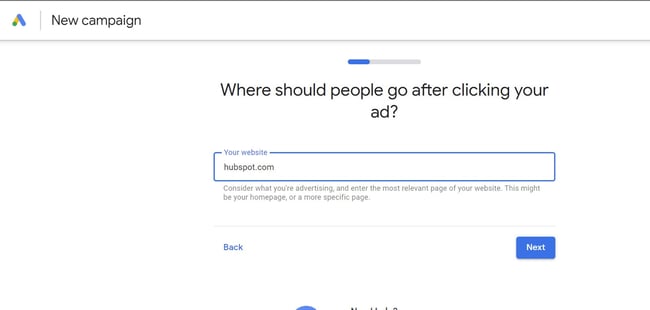
After logging in, you will be directed to a screen where you must enter the name of your company and its website. Anyone who clicks on your advertisement will be directed to the URL you provide.


3. Decide on your marketing objective.

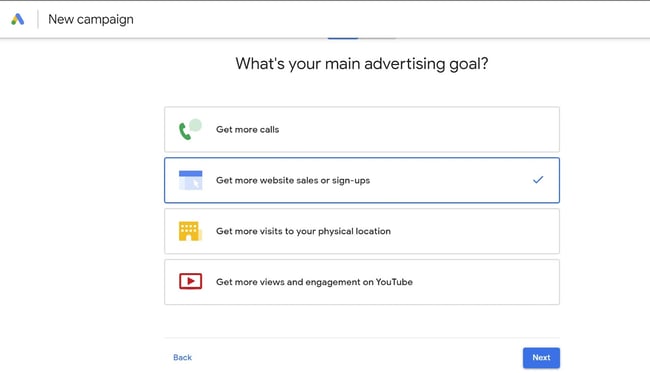
Select your primary advertising objective next. You have four options: increase phone calls, internet sales or signups, foot traffic to your storefront, and YouTube views and engagement.


4. Create your advertisement.

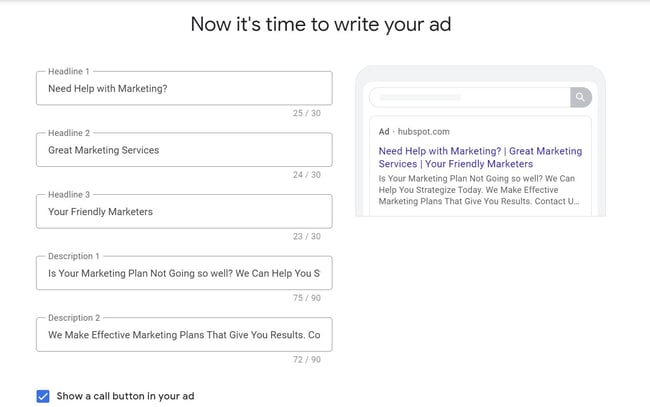
Your ad needs to be created next. It can be tough and calls for inventiveness. Fortunately, Google offers suggestions for topics to write about. Of course, writing ads that draw in and convert your audience is the most crucial step.

5. Add the theme keyword.

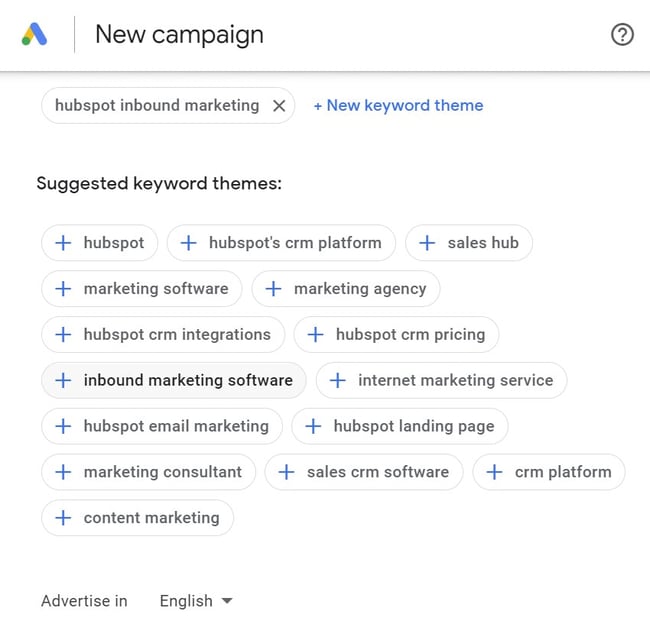
You can select keywords that work with your brand on the following page. If you're not experienced with keyword research, it's better to start with what Google suggests. Google will provide a few suggestions for you. Select the appropriate keywords and then click "Next."

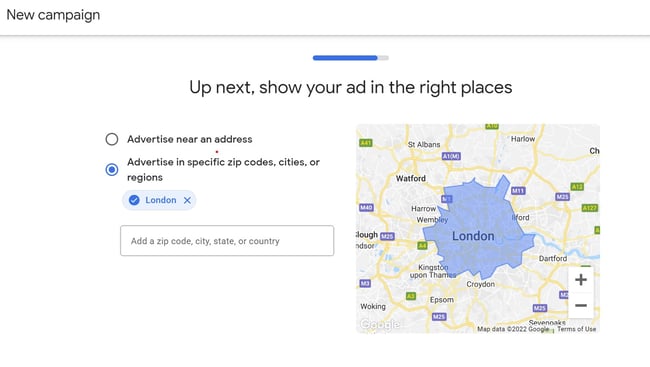
6. Choose the place for your advertisement.

You can select the area or locations where you want your advertisement to appear on the following page. It can be far from your home location or somewhere else.

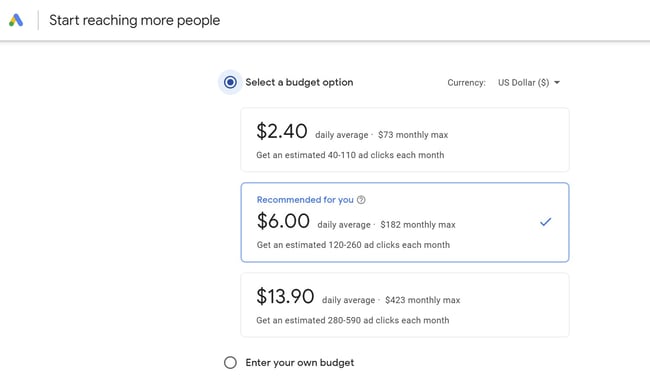
7. Establish a budget.

Here, you can specify a specific budget or choose from Google's budget possibilities.

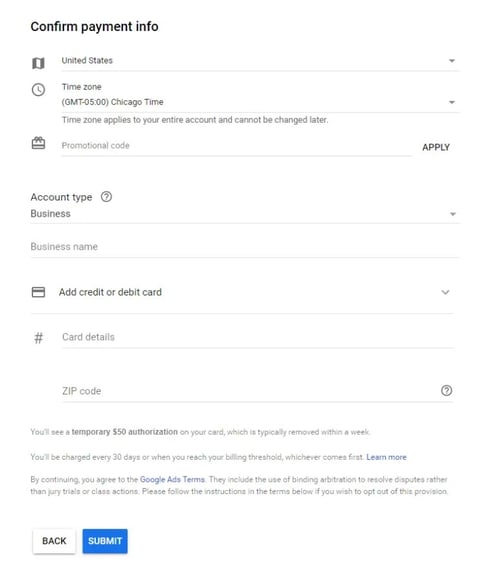
8. Verify your payment.

Give your billing details last.


How simple it is to make your first Google ad, too!
As you can see, setting up your sponsored campaign on Google is reasonably simple (and quick), thanks in large part to the platform's step-by-step setup instructions and helpful hints. Setup shouldn't take longer than 10 minutes if your ad copy and/or image have already been generated. Less evident are all the extra steps you must take to make sure your advertising are well-positioned and simple to track. Let's talk about it together. These are the actions you will take after submitting your advertisement for review.

9. Connect your Google Analytics profile.

If not, here's how to set up Google Analytics in WordPress so you can track your traffic, conversions, goals, and any other special data. Additionally, you have to connect your Analytics account to Google Ads. Because you can view these occurrences in one location, linking these accounts makes tracking, analyzing, and reporting between channels and campaigns easier.

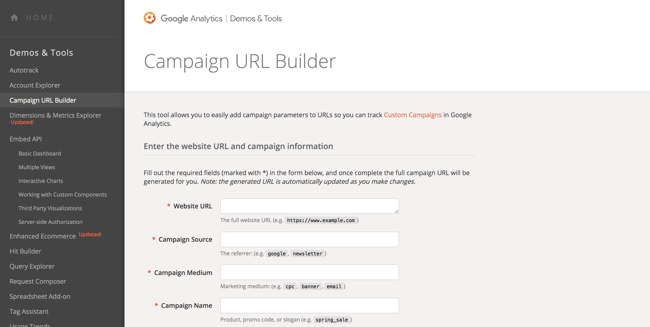
10.Add UTM code

Google uses the Urchin Tracking Module (UTM) code to monitor all actions connected to a specific link. Probably familiar to you, this is the portion of the URL that comes after the question mark ("?"). You may track the most successful components of your campaign by using the UTM code, which will reveal which offer or advertisement led to the conversion. Google Ads optimization is made simple by UTM codes because you are aware of what is effective. The secret is to input your UTM code when configuring Google Ads so that you don't have to manually add it for each ad URL. If not, use Google's UTM generator to manually add it.


11. Set up tracking of conversions.

The number of clients or leads you receive directly from your advertising initiatives is shown through conversion tracking. Although setup is not required, your ad ROI will be inferior to none without it. You can monitor sales (or other activity) on your website, app installs, or phone calls generated by your adverts by using conversion tracking.


12. Connect your CRM and Google Ads.

Keeping all of your data in one location where you can track, examine, and report on it has merit. For managing contact information and lead flow, you currently use CRM. In order to continue promoting your audience with pertinent offers, you may track which ad campaigns are effective for them by integrating Google Ads with CRM.


Strategy for Google Ads Bidding
It's time to start bidding once your ad campaign has been set up and tracking has been installed. Keep in mind that your potential to rank in Google Ads depends on your bid strategy. When starting a sponsored campaign, there are a few methods and bid settings you should be aware of even though your bid amount will depend on your budget and objectives.

Automatic versus manual bidding

You can choose between automated and manual bidding for your keywords. This is how it goes:
With Automated Bidding, Google is in charge and the platform might modify your bid based on the competition. In order to offer you the best chance of winning bids, Google will still let you choose a maximum budget, and it will operate within that range.
By setting bid levels for ad groups and keywords, manual bidding enables you to cut costs on ads that aren't performing well.

Purchasing branded search terms

A branded phrase is one that contains your business's name or the name of a distinctive product, like "CRM HubSpot." Whether or not to bid on your branded terms is a topic of much discussion. On one side of the argument, placing a bid on terms that are most likely to result in organic outcomes can be viewed as a financial waste. However, if you bid on phrases, you can get the top domain on this search results page and convert prospects that are further along the cycle. For instance, if I've looked into live chat solutions and highly recommend HubSpot Live Chat, a simple search for "HubSpot live chat software" will produce the information I need without the need for any additional filters. Another reason to bid on your branded phrases is that if you don't, your competitors might, so stealing valuable real estate that is rightfully yours.

Cost Per Acquisition (CPA)

 You can set a CPA and only pay when a user converts to a customer if the thought of spending money to convert leads into leads makes you uneasy. Although using this bidding approach may be more expensive, you can rest easy knowing that you only pay when a paying customer is acquired. This tactic makes tracking and defending your advertising expenditure simple.

Additional Tools to Improve Your Google Ads

Your sponsored campaign's success depends on more than just your ad copy and headlines. Just getting users to click is the first step. They must arrive on a landing page that is optimized for conversions before being transferred to a Thank You page that instructs them on what to do next. Check out these extra resources if you want Google Ads to produce high-quality leads and clients, and use them as a reference as you build up your Google Ads campaign.
  • In order to avoid wasting those priceless clicks, Landing Page Best Practices will show you how to create a landing page that converts well. 
  • An efficient "Thank You" page demonstrates how to handle your new leads after conversion, as well as how to retain them on your website and keep their interest. 
  • Tips for Google Mobile Advertisements show you how to optimize for both desktop and mobile ads as well as the key distinctions between them. 
  • You may learn how we at HubSpot maximize our Google Ads spend to get the best ROI by reading Optimizing Google Ads Cost. 
  • Examples of Quality Google Ads That Convert provide illustrations of effective Google ad campaigns.

Tips for Google Ads

Here are a few simple recommendations or best practices to keep in mind as you create a successful campaign now that you understand how to use and set up a Google Ads campaign.
They have been extensively discussed in this piece, but it is impossible to exaggerate how important they are. Make use of this as a checklist that you can use repeatedly.

1. Set clear objectives.

Before you develop an advertisement, it's critical to establish your goals. This is preferable than generating an advertisement first, then modifying it to meet your aims. Meet with your marketing team to develop SMART goals for your Google Ads campaigns and a plan for your advertising.

2. Construct pertinent landing pages.

Make sure the URL you supply when requested to add one when generating an advertisement leads to a pertinent landing page. If they click on your advertisement because it is intriguing enough, all your hard work could be for naught if the landing page is subpar. As a result, make sure your landing page is optimized to help your advertisement convert interested people into paying clients. To learn exactly how to create a fantastic landing page, check out our guide to landing pages.

3. Make good use of keywords.

Since keywords are crucial, you should pick the ideal ones for your advertisement. Long-tail keywords are among the best because they can target a particular firm and are extremely specialized. Imagine you manage a cat clinic. While broad terms like "cat clinic" won't specifically target local residents, phrases like "cat clinic in the belvedere" are more likely to draw in the proper crowd.

4.Automate the procedure, 

Conversions can be increased by optimizing the bidding process. Depending on your chances of success, tools like Smart Bidding might boost or drop your bids for you. As a result, you will only invest money where there is a greater likelihood of success.

5. Make use of ad extensions

Extensions can boost the effectiveness of your advertisements. You can describe locations, services, products, or marketing campaigns with these extensions. For instance, you might provide a phone number in your advertisement so that people may contact and inquire about your services straight from you.

6. Use limiting keywords.

You can enter negative keywords in Google Ads. By utilizing these keywords to describe what your product or service is not, you can avoid showing up in pointless SERPs. In the hypothetical cat clinic, you might only treat cats and no dogs or other animals. In this situation, you can exclude qualifiers like "dog" and others.

7. Evaluate and tweak your plan.

Integrating your advertisements with Google Analytics allows you to monitor crucial data points like page popularity, the most popular search terms, and more. You may increase ad quality, conversions, and income by gathering and analyzing these and other information. once in a while.

Launch a Google Ads campaign
Given its power and reach, Google Ads ought to be a component of your paid campaign. Use the advice we provide to get going, and keep in mind to improve and iterate as you go. There is no such thing as a Google Ads campaign that is unsuccessful; rather, there are those that could use a bit more attention. You now have the knowledge and tools necessary to design effective Google Ads campaigns that generate clicks and convert leads. 
Editor's note: For the sake of completeness, this article, which was initially published in November 2015, has been updated.

https://blog.hubspot.com/cs/c/?cta_guid=52b81520-a6bb-4f3f-aaf3-5a753b13db17&signature=AAH58kGlPkEwVu3Piq1WDIYv82CoXLuC4Q&pageId=3534382978&placement_guid=c5cea574-dc9b-436a-8cc5-0d208bf2cbd9&click=f8c8fe4a-a77b-4039-a259-a55a7d843d94&hsutk=41dcacae8fda926d1fe8b28b599dc90a&canon=https%3A%2F%2Fblog.hubspot.com%2Fmarketing%2Fgoogle-adwords-ppc&portal_id=53&redirect_url=APefjpF94Sxu-UkZcGA50__x4DrVO5x68xVZmm3-qTnrDAkDbnpOogvTT0R1rhWwOXOk1l8-anBHq7iEiC7uuYWVMJ22qD5P8yREvyzZUcD0bnVobSctfkJoHivrjW7KTh9Ji03JOv-kxpiHPyEMXFFS9Mx-8_QkrB47dfdwW-QIQtAedcVcLZY&hubs_signup-url=blog.hubspot.com/marketing/google-adwords-ppc&hubs_signup-cta=cta_button&hubs_post=blog.hubspot.com/marketing/google-adwords-ppc&__hstc=20629287.41dcacae8fda926d1fe8b28b599dc90a.1672243400447.1672243400447.1672243400447.1&__hssc=20629287.1.1672243400448&__hsfp=2106980548&contentType=blog-post


Komentar

Postingan populer dari blog ini